
Collection Runner
Run saved requests as smoke tests, regressions, or data-driven checks.
The Collection Runner executes saved requests from a collection or folder and turns the result into a pass/fail report. It is designed for local smoke tests: no account, no cloud monitor, no scheduler.
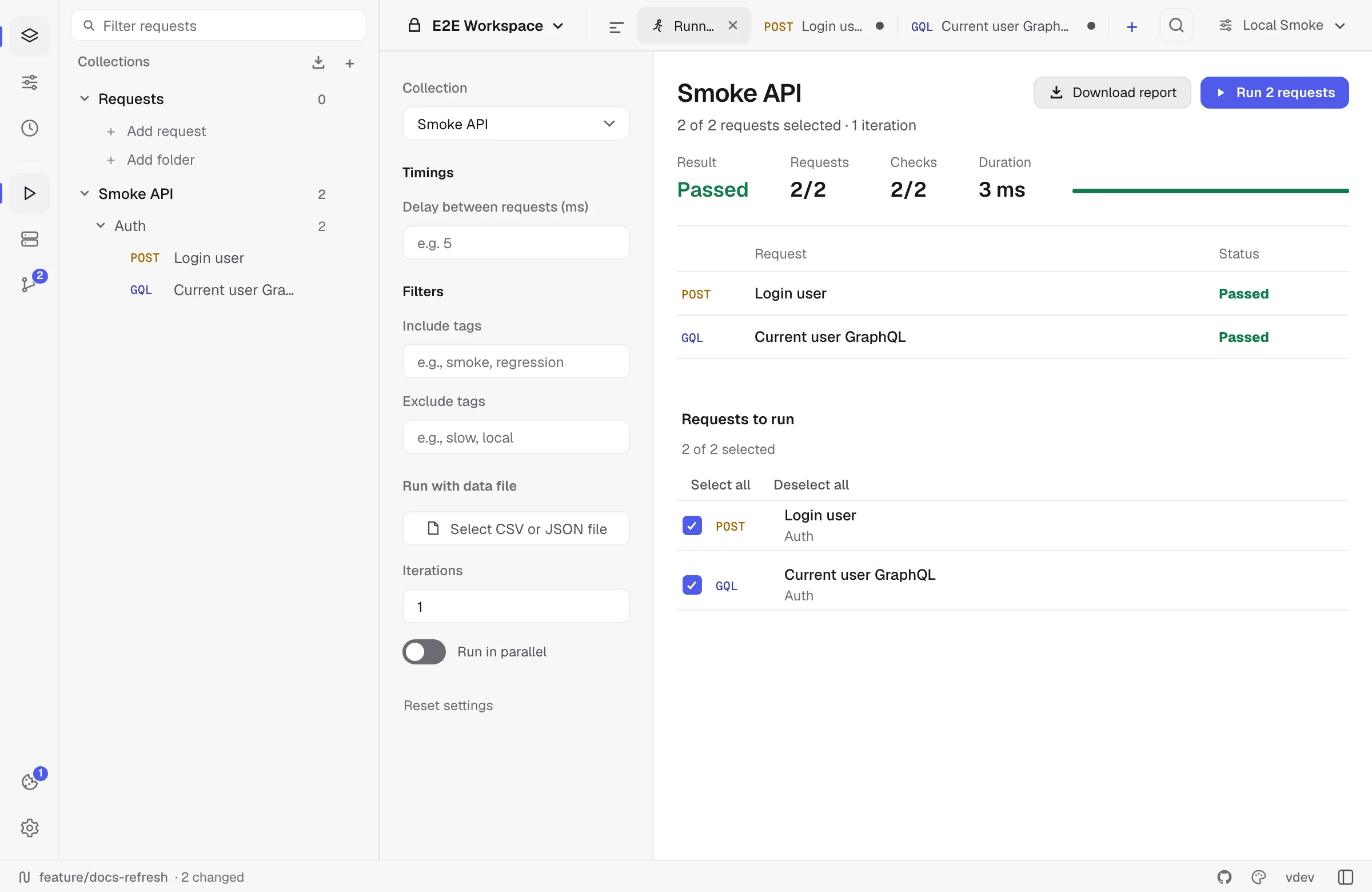
Opening the runner
Open it from:
- A collection menu: Run collection.
- A folder menu: Run folder.
- The play icon in the activity rail on the left.
- The workspace overview quick action.
Relay opens the runner workspace and selects runnable requests from the current collection. Realtime sessions (SSE, WebSocket, Socket.IO) are skipped because they do not naturally finish. HTTP, GraphQL, and gRPC requests can run.
Selecting requests
The runner list shows method/transport, request name, folder path, and tags. You can:
- Select/deselect individual requests.
- Select all or deselect all.
- Filter by include/exclude tags.
- Run just a folder by launching from that folder’s menu.
Tags are inferred from folder path, transport label, and request type. For example, Billing / Refunds / POST / http gives you useful filters without adding a separate tagging UI.
Timing and parallelism
Use Delay between requests when a server rate-limits or when order matters. Sequential runs wait between each request. Parallel runs execute one iteration at a time and wait between iterations.
Enable Run in parallel only for independent requests. If a test mutates shared environment values, keep the run sequential so each request sees the latest values from the previous request.
Max concurrent requests caps how many run at the same time (default 8, maximum 64). Raise it for fast, independent read-only endpoints; lower it when the server rate-limits or when a large collection would otherwise open more sockets than the machine is happy with.
Iterations
Set Iterations to run the selected set multiple times. Each request gets a result row per iteration, so flaky endpoints are easier to spot.
Iterations are ignored when a data file is loaded; the number of rows in the file becomes the iteration count.
Data-driven runs
The runner accepts CSV or JSON files. Each row becomes a set of variables for that iteration and overrides the active environment for the request being sent.
CSV:
userId,region1001,eu1002,usJSON:
[ { "userId": "1001", "region": "eu" }, { "userId": "1002", "region": "us" }]Inside a request, use {{userId}} or {{region}} like any other variable.
Pass and fail rules
A request passes when:
- The transport succeeds.
- The response status is below 400 for HTTP/GraphQL.
- gRPC returns
OK. - All test-script assertions pass.
A request fails when the transport errors, headers are invalid, a script errors, a status is considered failed, or any test assertion fails.
Reports
After a run, click Download report to save an HTML report. It includes:
- Summary counts.
- Duration.
- Delay/parallel/filter/data-file settings.
- Every request result.
- Test names and failures.
Reports are local files; Relay does not upload them anywhere.
Last run
Relay remembers the most recent finished run of each collection — every request’s status, time, checks and error, up to 500 results. Open the runner on that collection, or switch its Collection picker back to it, and the results are there with Last run and when it happened above them, until you run again. The collection’s own page shows the same run as one line — Last run 2 hours ago · 12 of 13 passed — and the link opens the runner.
A run where every request was skipped is not recorded. The results live in the encrypted local profile next to your history, never in the workspace YAML, so they are not committed to Git and stay on this device.
Common gotchas
- No runnable requests: the selected collection only contains realtime requests or empty folders.
- gRPC request fails immediately: select a gRPC method before running it.
- Environment values changed: scripts can call
pm.environment.set; after the run Relay merges the final environment state back into the active environment. - Cookies changed: the cookie jar is refreshed after the run, just like after normal sends.