
Per-request settings
HTTP version, redirect policy, TLS verification, cookie jar, timeout, URL encoding, proxy, and protocol controls for one request.
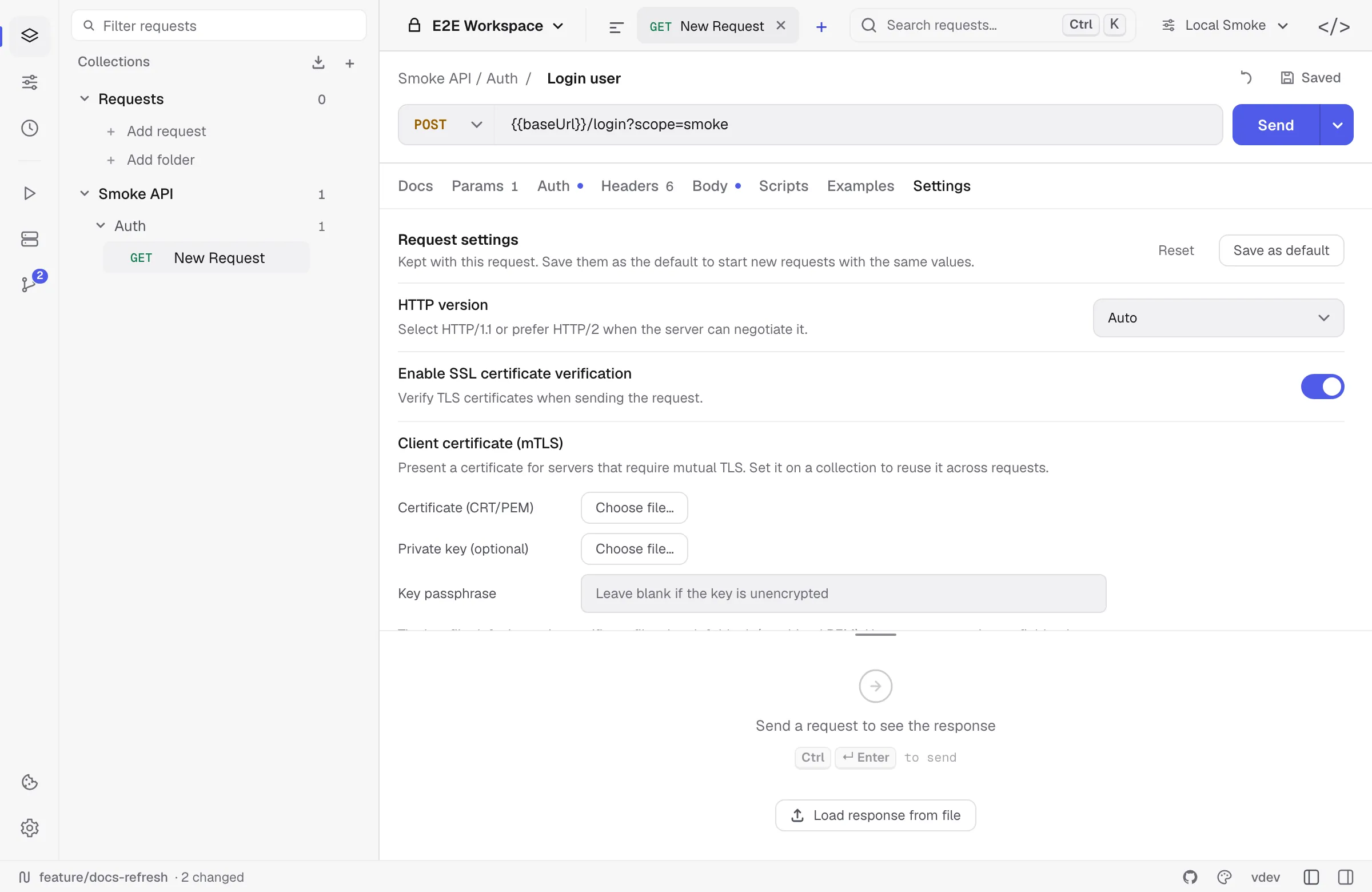
Open the Settings tab inside any request to override Relay’s defaults for that single request. The Settings tab is the rightmost tab in the request editor, after Scripts.
Every setting on this page is per-request — changing it on Get user doesn’t affect Get billing. Settings travel with the request when you export, duplicate, or commit it to Git.
App-wide preferences (autosave, theme, shortcuts, updates) live in a separate Settings modal opened from the gear at the bottom of the activity rail. See App settings for that surface.
HTTP version
Choose how Relay negotiates the protocol:
| Value | Behaviour |
|---|---|
Auto (default) | ALPN negotiates HTTP/2 if both ends support it, otherwise HTTP/1.1. |
1.1 | Force HTTP/1.1. Useful when an upstream proxy mishandles HTTP/2. |
2 | Require HTTP/2 over TLS. Connect fails if the server doesn’t speak it. |
HTTP/3 is not yet supported.
Redirect policy
By default Relay follows up to 10 redirects. You can change this and decide what to do with them:
- Follow redirects — toggle. Off means a 3xx returns the redirect response itself, with the
Locationheader visible in the Headers tab. - Max redirects — integer cap. Set to
0to behave like Follow off. - Preserve original method — when on, a 301/302 redirect from
POSTstaysPOSTinstead of becomingGET. RFC 7231 allows the agent to switch the method; this toggle forces the safer “preserve” behaviour. - Preserve Authorization header — by default, redirecting to a different host drops the
Authorizationheader to avoid leaking credentials. Turn this on if you’re following redirects within a trusted multi-host system. Same-host redirects always keep the header. - Remove Referer when downgrading — drop the
Refererheader when redirecting fromhttps://tohttp://. Matches browser behaviour.
TLS / SSL verification
The toggle Enable SSL certificate verification is on by default. Turning it off makes Relay accept any certificate the server presents, including self-signed and expired ones.
When you disable it, Relay shows a one-time confirmation dialog explaining the risk. Re-enabling is one click in the same place.
:::caution Disabling SSL verification opens you to MITM attacks on that request. Only use it against a server you control or a known-good staging endpoint. :::
For corporate root CAs, the cleaner fix is to install the CA into your system trust store — Relay uses the OS trust roots, so once the CA is trusted system-wide it works in Relay too.
Client certificate (mutual TLS)
For servers that require mutual TLS, present a client certificate under Settings → Client certificate (mTLS):
- Certificate (CRT/PEM) — the client certificate file, in PEM format.
- Private key (optional) — the key file. Leave it blank when the key is in the same file as the certificate (a combined PEM).
- Key passphrase — only for an encrypted key. It accepts a
{{variable}}, so you can point it at a workspace secret instead of storing it in the YAML.
Set it under Collection settings → Settings to reuse one certificate across every request in the collection, the same way other settings inherit.
A missing file, a mismatched certificate/key pair, or a wrong passphrase fails the request before it dials, with a message that says which. Relay supports PEM keys, including the legacy openssl encrypted format; PKCS#8-encrypted keys need converting first (openssl pkcs8 -in key.pem -out key.dec.pem).
Timeout
Request timeout (ms) caps the total time from connection start to body fully read. Default: 30 000 ms (30 seconds). Set to 0 to wait as long as the server takes — useful for Send and download of a large file.
The timeout includes:
- DNS resolution
- TCP connect / TLS handshake
- Request body upload (for
POST/PUT) - Server processing time
- Full response body read
If the timeout fires, the response shows a friendly error: “The request timed out after 30 s. Check the URL and try again.” The duration counter still shows how long Relay actually waited.
Script settings
Script timeout (ms) caps how long a single pre-request or test script may run. Leave it at 0 for the default 2 000 ms; raise it for a heavy assertion suite or a signing step. The ceiling is 60 000 ms, so a runaway loop can never wedge a send.
Allow pm.sendRequest lets this request’s scripts make their own HTTP calls — fetching a token before the send, or chaining setup. It is off by default: the script sandbox has no network access unless you ask for it. See pm.sendRequest for its limits.
Both live under Collection settings → Settings as well, and a request that has not touched them inherits the collection’s value — in the app and in relay run alike. --script-timeout and --allow-send-request override the whole run.
Cookie jar
The toggle Use the cookie jar controls whether Set-Cookie responses are stored and replayed:
- On (default) — cookies sent in responses are added to the per-workspace cookie jar. On subsequent requests to the same domain, matching cookies are attached automatically.
- Off — Relay neither stores nor sends jar cookies for this request. You can still set cookies manually via the
Cookieheader.
The jar is shared across all requests in a workspace. View / edit it via the cookie icon at the bottom of the activity rail.
See Cookies for manual cookie editing, matching rules, and backup behavior.
URL encoding
Encode URL automatically (on by default) percent-encodes characters in path segments and query values when Relay sends the request. Examples:
- A space in a query value (
q=hello world) becomesq=hello%20world. - Cyrillic / emoji / other non-ASCII characters are encoded per RFC 3986.
Turn this off if your server uses non-standard encoding rules — Relay will then transmit your URL byte-for-byte as you typed it.
Proxy
HTTP proxy accepts a complete HTTP, HTTPS, or SOCKS5 proxy URL. A non-empty request value overrides both the collection proxy and the app-wide proxy.
Leave the field untouched to inherit the collection setting. If no collection URL applies, Relay uses Settings -> Proxy. Clearing the field after editing it creates an empty request override, skips the collection value, and falls back to the app-wide setting.
See Proxy configuration for the complete precedence and bypass rules.
Browser security emulation
Use these controls to add a browser-like origin and user agent, enforce CORS preflights and response checks, or block URLs rejected by a page’s CSP connect-src.
See Browser security emulation for credentials mode, same-origin behavior, supported CSP sources, and protocol differences.
WebSocket / Socket.IO–specific settings
For ws:// / wss:// and Socket.IO requests, extra knobs appear:
- Handshake timeout (ms) — how long to wait for the initial HTTP upgrade.
0uses the transport default. - Reconnect attempts — number of automatic reconnect attempts after an abnormal close.
0= never reconnect. Default0. - Reconnect interval (ms) — delay between reconnect attempts. Default
5 000. - Max message size (MB) — read limit per message. Default
10 MB. Reduce if you’re testing constrained servers; increase if you legitimately stream larger messages. - Keep-alive interval (ms) — how often to ping the server to hold the connection open.
0uses the default;-1stops pinging entirely, which is what you want against a server that treats an unsolicited ping as a protocol error.
SSE-specific settings
A request whose method is set to SSE gets two more:
- Reconnect automatically — on by default, matching a browser
EventSource: the stream resumes from the last event id it saw. Turn it off to watch a failing stream stop instead of retrying, which is what you usually want while debugging the server end. - Reconnect interval (ms) — how long to wait before reconnecting.
0follows the interval the server sends in itsretry:field.
gRPC requests also show gRPC-specific settings: TLS, reflection, server name, default-value inclusion, and max response message size. See Request types for how the protocol-specific editors differ.
Reset to defaults
Click Reset at the top of the request Settings tab to restore Relay’s built-in request values and clear collection override markers. Collection defaults can then apply again when the request is sent.
Where these settings live in your data
Per-request settings are saved alongside the request. Local profile state is stored in encrypted requests.json; folder/Git workspaces store shareable settings in YAML. Settings are exported where the target format can represent them and preserved by Relay/OpenCollection round-trips.