
Proxy configuration
Configure Relay's global, collection, and request proxy behavior, including system settings, SOCKS5, authentication, and bypass rules.
Relay can use a global proxy on this device and a proxy URL stored with a collection or request.
Precedence
Relay resolves proxy configuration in this order:
- A non-empty proxy URL explicitly set on the request.
- A collection proxy URL inherited by a request that has not overridden that setting.
- The app-wide proxy under Settings -> Proxy.
Clearing the proxy field on a request marks that field as a request override. The request then skips the collection proxy and falls back to the app-wide setting. Click Reset in the request Settings tab to clear its override markers and inherit collection defaults again.
:::note
Relay does not have a direct:// per-request value. To connect directly, remove request and collection proxy URLs and set the global mode to Off.
:::
Global modes
Open Settings -> Proxy and choose:
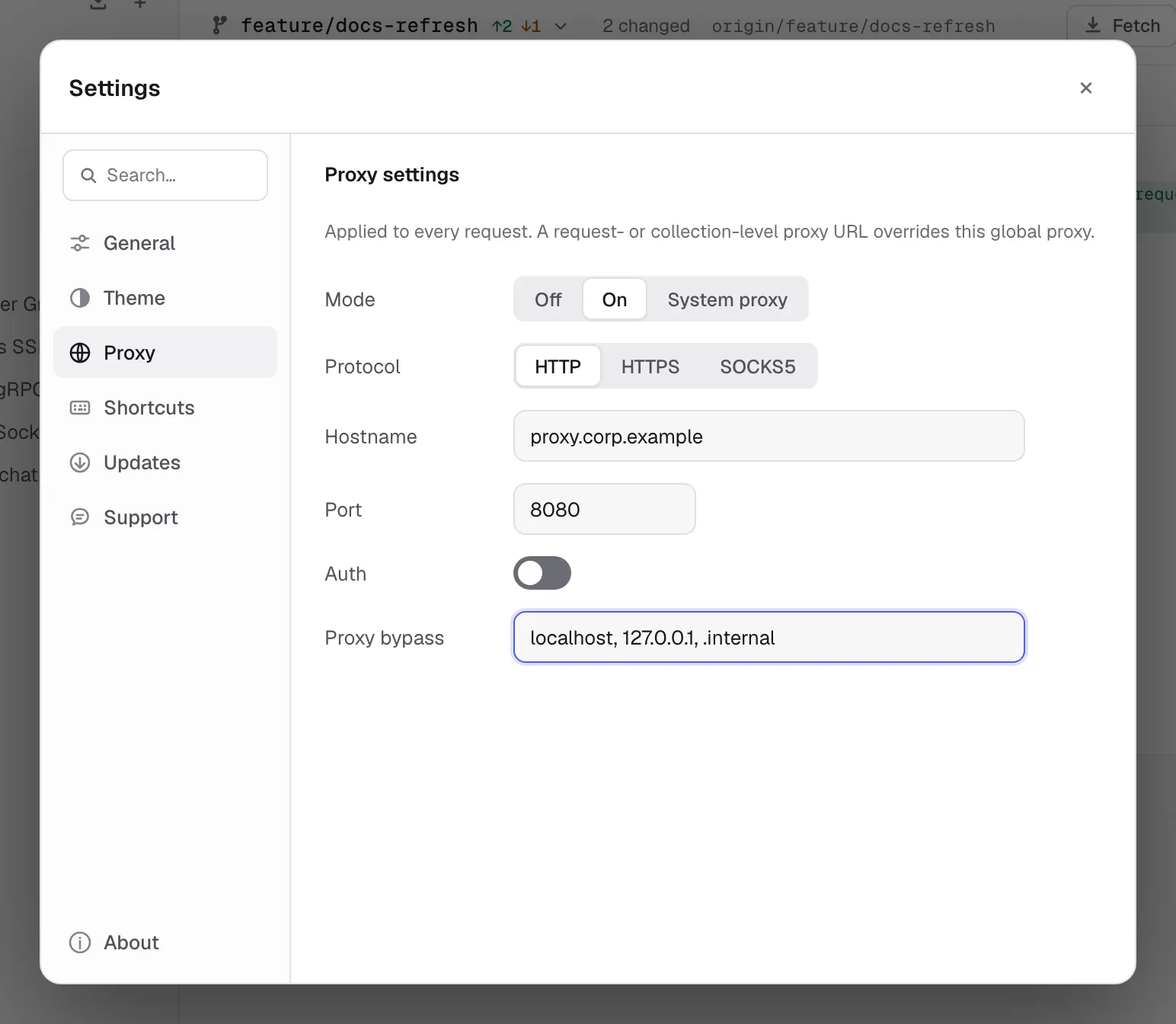
| Mode | Behavior |
|---|---|
| Off | Connect directly. Environment proxy variables are ignored. |
| On | Use the custom HTTP, HTTPS, or SOCKS5 proxy configured below. |
| System | Use the standard HTTP_PROXY, HTTPS_PROXY, and NO_PROXY environment behavior. |
When On is selected, Relay requires a hostname. If it is blank, requests fail instead of silently going direct.
For a custom proxy, configure:
- Protocol: HTTP, HTTPS, or SOCKS5.
- Hostname: without a URL scheme.
- Port:
0uses the protocol’s normal URL behavior; SOCKS5 defaults to1080. - Auth: optional username and password.
- Proxy Bypass: hosts that must connect directly.
The global proxy password is kept only in the running app. Relay deliberately removes it from persisted preferences and all-data backups, so you must enter it again after restarting Relay or restoring a backup.
Bypass rules
Separate bypass entries with commas, semicolons, spaces, or new lines:
localhost, 127.0.0.1, .internal, *.example.testMatching is case-insensitive:
example.testmatches that host and its subdomains..example.testand*.example.testuse the same suffix behavior.*bypasses the proxy for every host.
Enter hostnames only, without a scheme or port.
Collection and request URLs
The collection and request fields accept a complete proxy URL:
http://proxy.example.com:8080https://proxy.example.com:8443socks5://127.0.0.1:1080http://username:password@proxy.example.com:8080A request URL is the strongest override. A collection URL applies to requests that still inherit that setting. When the effective URL is empty, Relay uses the global mode.
Credentials embedded in a request or collection proxy URL become part of that saved API data. Do not put them in a shareable workspace; use the device-local global proxy authentication fields instead. Relay does not expand {{variables}} inside proxy URLs.
Troubleshooting
If every request fails after enabling a custom proxy:
- Confirm the global hostname is not blank.
- Verify protocol and port with another client.
- Re-enter the password after an app restart.
- Clear request and collection proxy fields while testing the global setting.
- Check whether a bypass entry is sending the target direct.
TLS verification still applies to the final HTTPS connection. If a corporate proxy intercepts TLS, install its root CA into the operating-system trust store instead of disabling verification broadly.