
Import & export
Move collections and workspaces between Relay, Postman, Insomnia, Bruno/OpenCollection, OpenAPI, HAR, curl, and Git.
Relay supports both one-off interchange formats and full Relay backups. Imports are non-destructive unless you explicitly choose the all-data restore path.
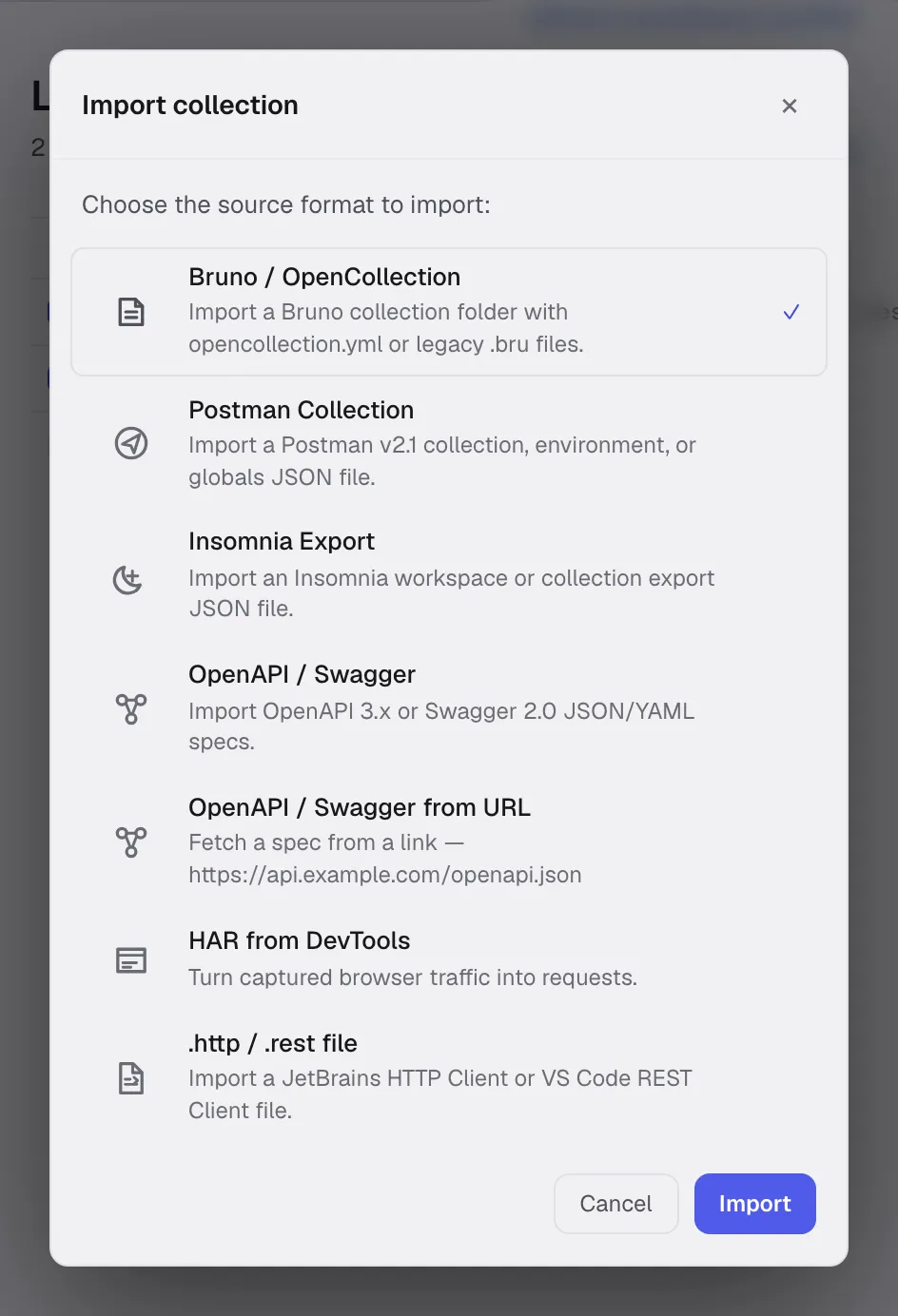
Supported sources
| Source | What Relay imports |
|---|---|
| Postman Collection v2.1 | Collections, nested folders, requests, auth, bodies, GraphQL, scripts, collection variables, and request documentation. Environment and globals exports import through the same picker. |
| Insomnia v4 JSON | Workspaces, folders, requests, auth, bodies, and environments. |
| Bruno/OpenCollection | Collections, explicit empty folders, requests, GraphQL, and supported metadata. |
| OpenAPI/Swagger | From a file or a URL. HTTP/SSE requests generated from operations, plus the collection defaults that make them sendable: the server becomes a {{baseUrl}} variable, path parameters become collection variables seeded from the spec’s examples, and declared security schemes become the request’s auth. |
| HAR | Captured HTTP requests. |
.http / .rest | JetBrains HTTP Client and VS Code REST Client files: requests, names, headers, bodies, and file variables. |
| cURL | A single request pasted into the URL bar, including the flags that map onto a request setting — -k, --max-time, --proxy — and a form part’s ;type=. |
| Relay all-data backup | Workspaces, collections, environments, requests, history, cookies, and selected UI/request preferences. |
| Relay Git/YAML workspace | Reviewable workspace files with local-only secrets. |
From Postman
Relay reads Postman Collection v2.1 — the JSON export, not the cloud-sync format.
- In Postman: right-click the collection → Export → choose v2.1.
- In Relay: click the import icon in the sidebar header (next to +) and pick the JSON file — or drag the file onto the sidebar.
- Relay creates a new collection in the current workspace, preserving the folder tree.
What carries over:
- Folder hierarchy — including folders that hold no requests — request names, methods, URLs.
- Headers, query params, body (JSON, form-data, raw, urlencoded).
- Pre-request and test scripts. JavaScript scripts map to Relay’s sandboxed JavaScript fields; legacy Tengo fields remain available for existing requests.
- Request descriptions, which become the request’s Docs tab.
- Collection-level variables, auth, and scripts, which become the collection’s defaults. A request that declared no auth of its own is set to Inherit auth, so the collection’s auth applies exactly as it did in Postman.
- The whole OAuth 2.0 configuration, not just a stored access token: grant type, authorization and token URLs, client id and secret, scope, audience, and refresh token.
Folders in Postman can carry their own scripts. Relay has no folder layer, so a folder’s script is copied into each request it contains, marked with a // --- from Postman folder "…" --- comment.
Environments and globals
Postman exports environments and globals as separate JSON files. Pick Postman collection in the import dialog and choose one of those files — Relay recognises it and imports it as an environment (made active) or merges it into Globals. Values Postman marked as secrets stay marked as secrets.
What doesn’t carry over:
- Postman cloud Monitors. Cloud Mock Servers do not come across as such, but the saved responses they were built from import as examples, which Relay’s own mock server serves locally.
- Visualizer scripts.
- Variable types beyond string/secret.
From OpenAPI / Swagger
Pick OpenAPI / Swagger and choose a JSON or YAML spec. Relay builds one request per operation, grouped into folders by the operation’s first tag, with the summary as the request name and the description as its Docs tab.
The point is a collection you can send straight away, so three things land on the collection rather than being baked into each request:
- The server becomes a
baseUrlcollection variable, and every request URL starts with{{baseUrl}}. Retargeting the whole import at staging is one edit. When the spec declares more than one server, the others are recorded in the variable’s description. - Path parameters become collection variables, seeded with the
exampleordefaultfrom the spec. Without them a path like/users/{userId}would import as{{userId}}with nothing behind it, and every request would refuse to send. - Security schemes become auth. A scheme declared for the whole document lands on the collection and each request is set to Inherit auth; an operation with its own
securitycarries that instead, andsecurity: []means the operation is public. HTTP basic, digest and bearer, API keys (with the name and location the spec gives), and OAuth 2.0 (with its token and authorization URLs and scopes) are mapped. The credentials themselves are not in a spec, so each one points at a collection variable —{{bearerToken}},{{apiKey}},{{oauth2ClientSecret}}— giving you one place to fill in.
openIdConnect is left as No auth: its endpoints can only be discovered by fetching the provider’s configuration, which the importer does not do.
Declared responses come across as examples, including a body derived from the response schema when the spec writes none — which means an imported spec can drive the mock server straight away.
From a URL
Pick OpenAPI / Swagger from URL and paste the link. A spec URL is what teams actually pass around, because it is the one that stays current, and Relay builds exactly the collection the file import would.
The document is fetched by Relay itself rather than by the embedded browser, so a spec host that sends no CORS headers still works, redirects are followed, and your proxy and TLS settings apply. A link with no scheme is read as https, and no cookies are sent.
The collection is named from the spec’s info.title. When the spec has none, Relay falls back to the host rather than to a path segment like /v3/api-docs, which names the format instead of the API.
One mistake is common enough to name: linking to the Swagger UI page rather than the document it renders. The page is HTML, and Relay says so and points at where the document usually lives — /swagger.json, /openapi.json or /v3/api-docs — instead of reporting a parse failure.
From a .http / .rest file
Pick .http / .rest file in the import dialog. Relay reads the format shared by the JetBrains HTTP Client and the VS Code REST Client:
@baseUrl = https://api.example.com
### List ordersGET {{baseUrl}}/orders?status=openAccept: application/json
### Create order# @name createOrderPOST {{baseUrl}}/ordersContent-Type: application/json
{ "sku": "RELAY-1" }###separates requests, and the text after it becomes the request name. A# @namedirective takes priority.- File variables (
@baseUrl = …) become collection variables, so{{baseUrl}}keeps resolving after import. - A bare URL line is treated as
GET, and a trailingHTTP/1.1is ignored. WEBSOCKETrequests and theX-REQUEST-TYPE: GraphQLheader map to Relay’s WebSocket and GraphQL request types.< ./body.jsonand> ./out.jsonreference files the importer cannot read. Relay records them in the request’s Docs tab instead of dropping them silently, as it does for JetBrains response-handler scripts (> {% … %}), which use an API Relay does not run.
From curl
Paste a curl command directly into the URL bar of a new request. Relay parses:
- Method (
-X) - Headers (
-H) - Body (
-d,--data-raw,--data-binary) - Basic auth (
-u) - Multipart fields (
-F)
URL-only curl commands work too — curl https://api.example.com/users becomes a GET request.
From Bruno/OpenCollection
Relay imports OpenCollection-style folders and request files. Empty folders are preserved explicitly, so a folder can exist before it contains a request.
Relay’s OpenCollection export writes:
folder.ymlfiles for explicit folder paths.- HTTP and GraphQL requests.
- Request-level scripts, settings, auth, params, headers, and bodies where the format supports them.
Git-backed YAML workspaces
For team sharing, prefer Relay’s Git/YAML storage over repeated JSON exports. It stores workspace state as plain YAML files:
relay.ymlandworkspaces/**/*.ymlare shared.- Sensitive values become
{{relaySecret:...}}placeholders; the real values remain in Relay’s encrypted local profile outside the repository. - Folder hierarchy is represented by
request.folderPathpluscollection.folderPaths, so empty folders survive round-trips.
See Relay YAML format for the public contract.
All-data backups
Use Settings -> General -> Advanced data -> Export all data for a Relay-to-Relay profile backup. Unlike collection interchange formats, it includes history, cookies, all local workspaces, and selected preferences.
The file is plaintext and can contain secrets. Import replaces the current local profile rather than merging it. See Backup & recovery for the exact contents, exclusions, recovery-key behavior, and a safe restore procedure.
Export
Relay can export a collection as Postman v2.1, OpenAPI, or OpenCollection, and can export its workspace data plus selected preferences as an all-data backup.
Secrets marked as secret are stripped, redacted, or kept as Relay secret placeholders depending on the target format. Git/YAML workspaces keep the real values in Relay’s encrypted local profile, outside shared files.
Sharing within a team
For day-to-day collaboration:
- Use Git-backed YAML workspace storage.
- Commit
relay.yml,.gitignore, andworkspaces/**/*.yml. - Keep
{{relaySecret:...}}placeholders intact; Relay resolves them from each user’s encrypted local profile. - Use import/export formats only for interoperability with another client.
For environment-specific variables, keep non-secret defaults in the workspace and put real secret values in local secrets.